
You found a 40-minute talk and you want Claude or ChatGPT to know what's in it. You were never going to watch all 40 minutes. Most chat assistants I use can't watch it for you. YouTube's own transcript panel shows the text, but you copy it out a screen at a time and then clean up the timestamps.
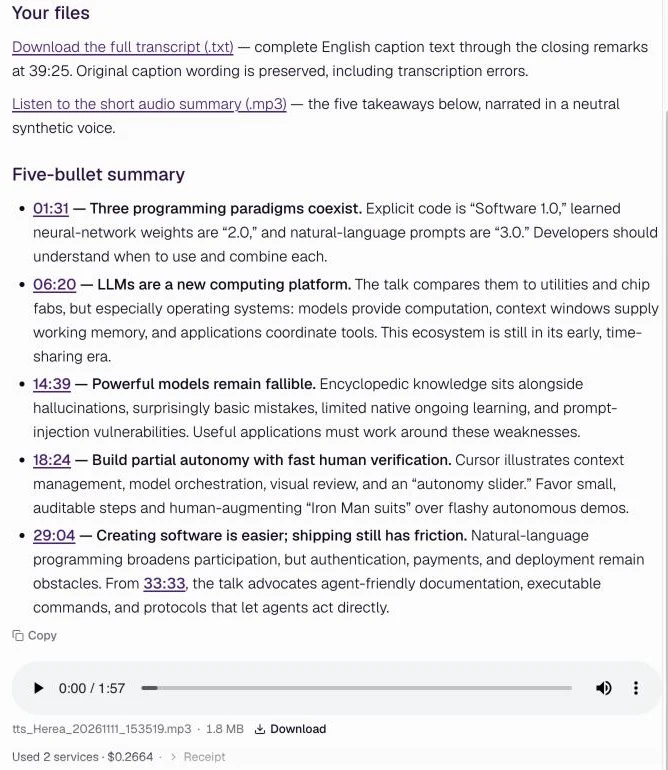
So on November 11 I gave an agent the link to Andrej Karpathy's talk Software Is Changing (Again) and asked for three things: the transcript as a file, a five-bullet summary with timestamps, and a short audio version for a walk. It took about two minutes. The transcript cost $0.0264. The audio cost $0.24.
| Step | Service | Cost |
|---|---|---|
| 1. Find which captions exist | YouTube Captions and Transcripts | $0.0088 |
| 2. Get the English text as a file | YouTube Captions and Transcripts | $0.0088 |
| 3. Get the same text with timestamps | YouTube Captions and Transcripts | $0.0088 |
| 4. Write the summary | the agent itself | $0.00 |
| 5. Read the summary out loud, 1:57 | ElevenLabs Text to Speech | $0.24 |
By hand
- Open the transcript panel
- Copy it out in pieces
- Paste it into a document
- Strip the timestamps
- Write your own summary
- a screen at a time
With an agent
- Paste the link
- Download the file
- Listen on the way
- about 2 minutes, $0.27
Step 1: Paste the link and say what you want back
In Delegate Agents:
Get me the full transcript of this YouTube talk: https://www.youtube.com/watch?v=LCEmiRjPEtQ . Save it as a text file, then give me a five-bullet summary with timestamps. Then turn that summary into a short audio clip I can listen to on a walk.
If you only want the summary, there's a starter under the prompt box, "Sum up a video", that fills in "Sum up [YouTube link] in five bullet points, with the best quotes."
Step 2: Let it pick the captions
The agent searched the catalog and found a captions service at $0.0088 a call. Its first call came back with a list instead of text: the talk has captions in 20 languages, and the service wants you to pick one. So it asked again for English. Then it asked a third time for the same captions as an .srt file, which carries a start and end time for every line. That's where the timestamps in the summary come from.
Step 3: Download the transcript
The .txt file runs through the closing remarks at 39:25. It keeps YouTube's caption wording, mistakes included. The first line welcomes "Andre Carpathy," because these are the captions YouTube already has, and many of those are generated automatically. For a quote you plan to publish, check it against the video.
Step 4: Check the summary against the video
Five bullets, each starting with a timestamp that links into the video at that second. So when the summary says the talk turns to what models still get wrong at 14:39, a click takes you there.
Step 5: Listen on the way
The agent sent the five bullets to ElevenLabs Text to Speech and got back an mp3 of 1.8 MB that runs 1 minute 57. Text to speech is priced by the number of characters, and the agent's first price check left that number out, so the check failed. It counted the characters, checked again and got a price of $0.24. Nothing was charged for the miss. (It failed, and nobody sent an invoice for it. Try that with a consultant.)
- from link to transcript, summary and audio
- about 2 min
- of talk transcribed
- 39:25
- for the transcript
- $0.0264
- for the audio summary
- $0.24
Other places your videos live
The same works for other platforms. I only ran the YouTube one; the prices below are from the catalog on November 11.
| Where the video is | Service | Price today |
|---|---|---|
| YouTube | YouTube Captions and Transcripts | from $0.0088 |
| YouTube | YouTube Video Summary & Transcription | $0.01 a video |
| TikTok | TikTok Transcript | $0.00018 |
| Instagram reels under 2 minutes | Instagram reel or video post transcript | $0.002068 |
| LinkedIn video posts | LinkedIn video post transcript | $0.002068 |
| X video posts under 2 minutes | X (Twitter) video post transcript | $0.002068 |
| Podcasts and any audio file | Transcribe Any Audio File | from $0.006 |
| Meetings and calls, with who said what | ElevenLabs speech to text | $0.000068 a second |
The last one works out to about 24 cents for an hour of audio.
Make it a habit
A chat in Delegate Agents can repeat on a schedule. So the same prompt can check a channel you follow every morning, save the transcript of anything new and send you the audio. Your watch-later list can finally die in peace.
Questions people ask
What if the video has no captions?
Then the captions service has nothing to return. Ask for the audio to be transcribed instead, with a service like Transcribe Any Audio File, which listens to the sound itself.
Can I get the transcript straight into Claude or ChatGPT?
Yes. Delegate connects to Claude, ChatGPT, Cursor and other agents over MCP, so you can ask for the transcript from the chat you already use. The developer docs cover the setup.
Is the summary right?
It's written from the transcript, so it's as right as the captions are. The timestamps make it quick to check any bullet against the video.
Open Delegate Agents and paste a link. Which talk would you hand it first?
Sources
- Andrej Karpathy, Software Is Changing (Again), YouTube.